A coupon helps only when the Netcup cart contains the product you want with the appropriate discount. Check the plan, location, quantity and contract terms alongside any success message. One detail is particularly important: Netcup warns that applying a coupon can add the associated product to the cart again.
This guide describes the process through our coupon list and explains what to check if a code is not accepted. Netcup shows the binding prices and conditions before you complete the order.
1. Choose the coupon for the product you want
Start with the plan you actually need. A code for Webhosting 2000 is not automatically suitable for Webhosting 4000. For servers, generation, configuration and sometimes location are also part of the selection. Compare the full product name rather than just the number in the plan name.
| Coupon type | What to check |
|---|---|
| Web hosting discount | Matching plan, location and displayed monthly price |
| Free months for VPS or root servers | Exact server configuration, number of free months and subsequent regular price |
| EUR 5 coupon | Listed on this website for new customers; not for domains |
| Direct offer without a code | Promotional price and conditions on the product page; no promise of an additional coupon discount |
The suffix NUE means Nuremberg. It does not tell you whether you must be a new customer. Check customer restrictions separately in the specific coupon conditions. The EUR 5 coupon listed here is explicitly for new customers and is not intended for domains.
2. Copy the code and open Netcup
- Open the relevant category: web hosting, VPS or root servers.
- Read the product description and conditions. Choose a code from the same product group as your preferred plan.
- Click the code chip. A €5 new-customer coupon is only copied: open Netcup yourself and paste it into the cart’s coupon field. For product-specific coupons, our website also opens the Netcup link in a new tab.
- Check which product and discount were carried over in the Netcup tab. If needed, paste the copied code into the cart's coupon area.
- Review the complete order before proceeding to checkout.
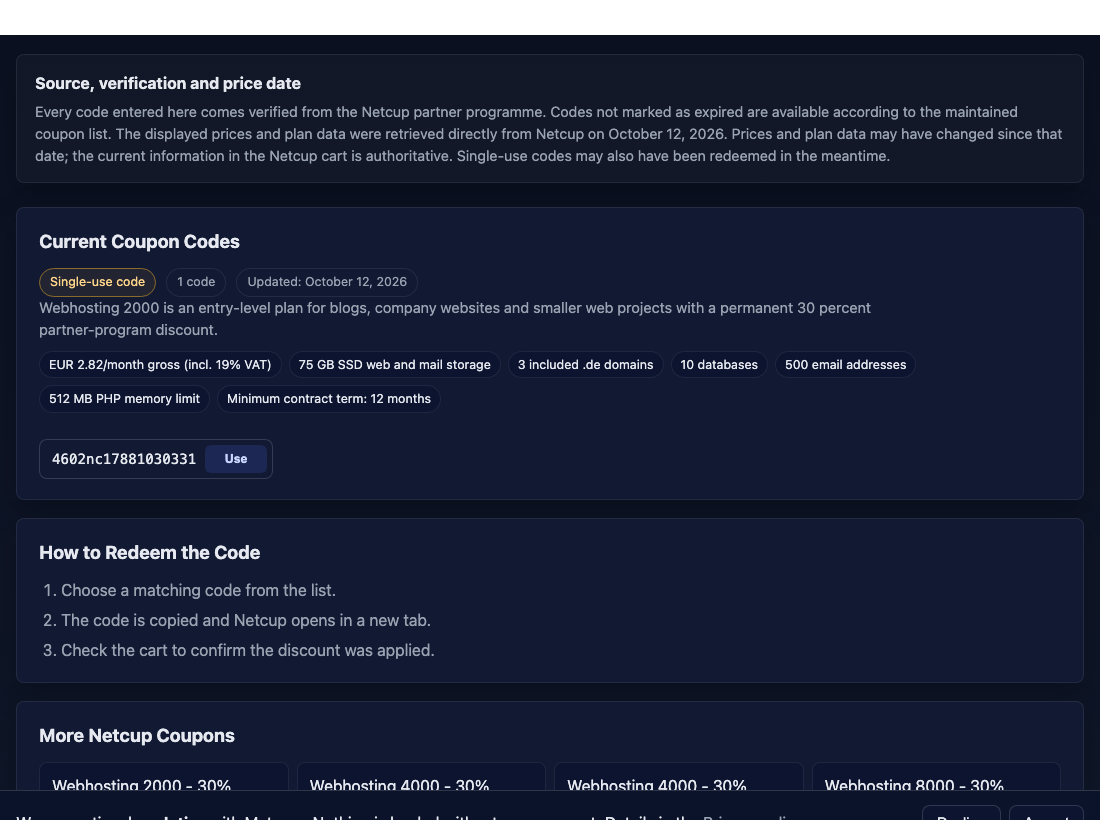
The automatic handoff is an aid rather than confirmation that a coupon was redeemed successfully. If your browser blocks the new window, copy the code manually and open Netcup yourself. If clipboard access fails, select the visible code and copy it through the context menu or keyboard shortcut. Avoid copying surrounding spaces.
If you already have a plan in the cart, checking product quantity is particularly important. Netcup explicitly mentions in both ordering guides that applying a coupon can create another product entry. Remove any unwanted duplicate and check the discount again afterwards.
3. Check the discount and the complete order
A lower first payment does not automatically mean a permanently lower monthly price. After a free month, the subsequent regular price still matters; a one-off euro discount affects the order differently from a recurring price reduction. Compare the entire period you expect to use the service.
- Product: Do the plan name, generation, location and features match?
- Quantity: Does the cart contain only the number of hosting packages or servers you want?
- Discount: Is the expected reduction or credit actually listed?
- Contract: What are the minimum term, billing interval and cancellation conditions?
- Extras: Are only the domains, options and other services you want included?
Compare amounts on the same tax basis and remember that a price quoted per month does not necessarily mean monthly payment. For a transparent calculation, read our 12- and 24-month cost comparison. If the expected discount remains unclear, resolve the conditions before completing the order.
If a code does not work, check these possible causes
| What you see | Next step |
|---|---|
| Code rejected | Check spelling and product group; for a single-use code, try another from the same group |
| Wrong plan appears | Compare the full plan name, generation and location with the coupon description |
| No new window | Check the popup blocker or enter the code manually at Netcup |
| Two identical products | Remove the unwanted extra entry and check the discount again |
| Discount missing on a special offer | Read promotion conditions and compare final prices of the available alternatives |
Single-use means that a code cannot be redeemed again after it has been used. Another visitor may already have redeemed it. Multiple codes within a product group usually provide the same type of discount; you do not need several for the same order.
An unlimited or future expiry date does not guarantee that a single-use code remains available. Equally, an error message does not prove that every code in the group is invalid. First try another matching code. If that also fails, record the product name, error message and displayed conditions, and ask Netcup before ordering.
Can discounts be combined?
Whether a code can be used on a promotional product depends on the coupon and promotion conditions. The current Netcup Deals FAQ (German) generally allows coupons on promotional products, but lists excluded product types and further conditions. Check the specific product page and the final amount in the cart. The availability of several discounts does not guarantee that they combine for the plan you want.
For example, you might compare a regular plan with a free month against a direct offer with a reduced monthly price. Calculate the cost of each separately for your expected period of use. A larger short-term discount can be less attractive over 24 months than a permanently lower plan price. Use only the price that Netcup actually displays for that particular option.
After choosing: keep a record of the order
Save the order summary or confirmation with the plan, price, duration and discount. You can then compare the first invoice with your selection. A coupon does not replace checking whether the hosting product fits your project: a website without custom system services has different needs from an application with a database you administer yourself.
If you have not yet chosen a product type, read our guide to choosing web hosting, a VPS or a root server. Our coupon codes are free to use. This website contains partner links; we may receive a commission if an order results from them.
Sources
Official ordering guidance checked on 12 October 2026. The copying and opening instructions describe the functionality of our own coupon list. The current official pages linked below are in German.
- Netcup: Ordering web hosting, coupons and duplicate cart entries
- Netcup: Ordering a server and checking the cart
- Netcup: Deals FAQ on using coupons for promotional products
- Netcup: Partner programme and coupon types
- Netcup: Location abbreviations NUE, VIE and MNZ
- Our coupon list: code chips, product groups and redemption function